IDA python自动化脚本补丁工具
目标:让libhasp_android_xxx.so能加载自己的id_xxx.so
工具:IDA,python
1 2 | 主要是对某safe加密锁的android保护库的补丁工具,最开始是手动修改代码,极不方便。有了这个脚本工具可一键生成补丁,轻松自在。先用IDA加载libhasp_android_x.so大概分析一下,下面是导出函数表 |
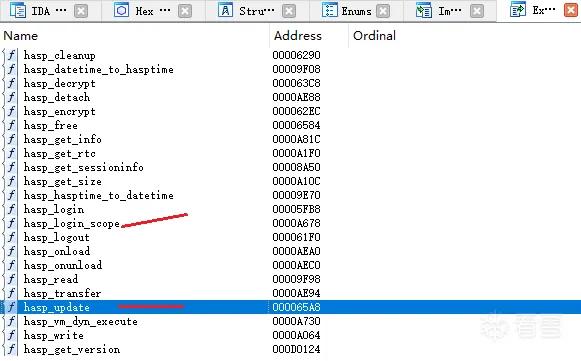
实际要操作的就两函数,一个是 hasp_login_scope,另外一个是 hasp_update.因为hasp_update一般程序中用不到,所以会把补丁代码放到这部分。双击hasp_login_scope进入,会看到函数的前面有些空调函数可以利用,nullsub我为了好记就叫他空调函数吧。
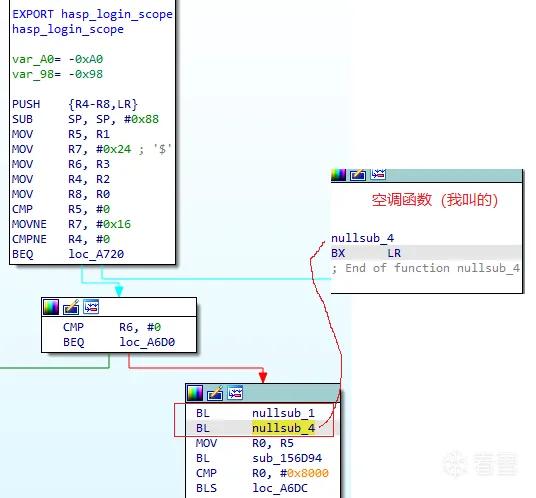
以后脚本会把 BL nullsub_4(nullsub_1也行)也成BL hasp_update,这样当程序调用加密锁时(一般第一就是hasp_login_scope)就会先来到hasp_update,下一步修改hasp_update字节,实现dlopen加载另外一个so
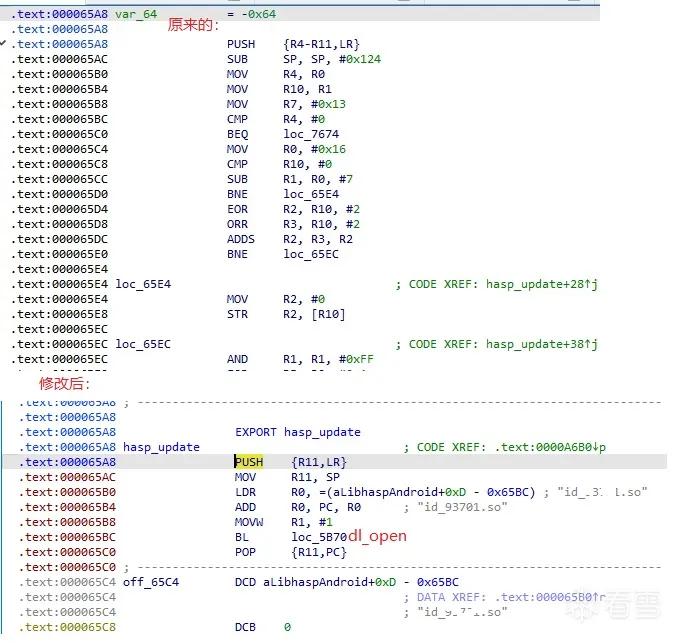 ![export ]
修改后的hasp_update里用到的字符串,和dlopen是需要重定位,要修正地址的,手动修改比较麻烦,有计算公式可自行bing chat,有了脚本就省事多了。其实脚本也参考bing AI. AI真是个宝!
再来看看原dlopen的地址 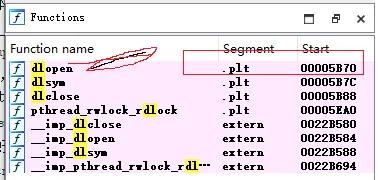

脚本上要用到dlopen,hasp_login_scope,及hasp_update的地址,还是给出脚本脚本,然后你找一个合适的so去研究吧。其它linux类的都可以这样做加载补丁,可研究修改。
1 2 3 4 5 6 7 8 9 10 11 12 13 14 15 16 17 18 19 20 21 22 23 24 25 26 27 28 29 30 31 32 33 34 35 36 37 38 39 40 41 42 43 44 45 46 47 48 49 50 51 52 53 54 55 56 57 58 59 60 61 62 63 64 65 66 67 68 69 70 71 72 73 74 75 76 77 78 79 80 81 82 83 84 85 86 87 88 89 90 91 92 93 94 95 96 97 98 99 100 101 102 103 104 105 106 107 108 109 110 111 112 113 114 115 116 117 118 119 120 121 122 123 | import loggingfrom elftools.elf.elffile import ELFFile#需要手动修改的仅2处#dlopen函数地址plt_dlopen_of = 0x00007264plt_dlopen_of = 0x00005B70 #老#hasp_login_scope中找个空调函数,IDA辅助找合适位置hasp_login_scope_BL = 0xA6B0#固定或可以自动定位的FileOrg = "libhasp_android_xxxx.so"#新生成的文件FileNew = FileOrg + ".new"#hasp_update偏移,可以自动定位hasp_update_of = 0x00000000# 字符串所在偏移FileNameAdd = 0x00000000#字节码补丁可实现调用id_xxx1.sohasp_update_code_new = b'\x00\x48\x2D\xE9\x0D\xB0\xA0\xE1\x0C\x00\x9F\xE5\x00\x00\x8F\xE0\x01\x10\x00\xE3\x1C\x00\x00\xEB\x00\x88\xBD\xE8\xEA\xFC\xFF\xFF'# 配置日志记录logging.basicConfig( filename='AutoFixSo.log', # 指定日志文件名 filemode='w', # 写入模式,'w'表示覆盖写入,'a'表示追加写入 format='%(asctime)s - %(levelname)s - %(message)s', # 日志格式 datefmt='%Y-%m-%d %H:%M:%S', # 日期格式 level=logging.DEBUG # 日志级别)def find_string_offset(binary_file, search_string): with open(binary_file, 'rb') as f: data = f.read() index = data.find(search_string.encode()) if index != -1: print(f"Found '{search_string}' at offset 0x{index:X}") return index else: print(f"String '{search_string}' not found in the binary file.") return -1#文件名libhasp_android_xxx1.so的偏移地址FileNameAdd = find_string_offset(FileOrg,FileOrg) def list_exported_functions(elf_file_path,fun_name): with open(elf_file_path, 'rb') as file: elf = ELFFile(file) symtab = elf.get_section_by_name('.dynsym') if not symtab: print("No dynamic symbol table found.") return 0 for symbol in symtab.iter_symbols(): if symbol['st_info']['type'] == 'STT_FUNC': #print(symbol.name) if symbol.name == fun_name: print(f"Function: {symbol.name}, Address: 0x{symbol['st_value']:X}") return symbol['st_value'] #取ELF中目标函数的偏移地址hasp_update_of = list_exported_functions(FileOrg,"hasp_update")logging.info(f"hasp_update_of = 0x{hasp_update_of:x}")logging.info(f"plt_dlopen_of = 0x{plt_dlopen_of:x}")logging.info(f"hasp_login_scope_nullsub = 0x{hasp_login_scope_BL:x}")logging.info(f"FileNameAdd = 0x{FileNameAdd:x}") def modify_high_byte(dword, new_byte): # 清除高第一个字节 dword &= 0x00FFFFFF # 设置新的高第一个字节 dword |= (new_byte << 24) return dword # 打开二进制文件with open(FileOrg, 'rb') as f: data = f.read()# 打开文件以写入模式with open(FileNew, 'wb') as f: # 将数据写回文件 f.write(data) # 移动到需要修改的位置hasp_update f.seek(hasp_update_of) # 写入新的二进制数据 f.write(hasp_update_code_new) print(f"patch hasp_update done") #修正 BL dlopen BL_dlopen_of = hasp_update_of + 0x14 print(f"patch BL dlopen @ 0x{BL_dlopen_of:X}") f.seek(BL_dlopen_of) #计算跳转 dwTmp = plt_dlopen_of - (BL_dlopen_of + 8) dwTmp2 = int(dwTmp/4) print(f"dwTmp2 {hex(dwTmp2 & 0xffffffff)}") newByte = 0xeb newDWORD = modify_high_byte(dwTmp2,newByte) newCode = newDWORD.to_bytes(4,byteorder='little') f.write(newCode) #修正字符串 7dc0 - 7DA4 = 1c newStrof = FileNameAdd - BL_dlopen_of + 0x0d newStrof = newStrof & 0xFFFFFFFF f.seek(hasp_update_of + 0x1c) newCode = newStrof.to_bytes(4,byteorder='little') f.write(newCode) #计算跳转 (0x00007DA4 - (0x0000BF34+8))/4 = FFFFEF9A dwTmp = hasp_login_scope_BL + 8 dwNew2 = int((hasp_update_of - dwTmp)/4) print(f"DWORD {hex(dwNew2 & 0xffffffff)}") newByte = 0xeb hasp_login_scope_BL_CODE = modify_high_byte(dwNew2,newByte) print(f"hasp_login_scope_BL_CODE {hex(hasp_login_scope_BL_CODE & 0xffffffff)}") #修改hasp_login_scope中的空调函数,跳到hasp_update f.seek(hasp_login_scope_BL) bData = hasp_login_scope_BL_CODE.to_bytes(4,byteorder='little') f.write(bData) f.close() |