Windows API Hooking 基础
API Hooking早在过去十年中被详细讲解过了,在此我為你們撰写了一篇逻辑性的教程。API Hooking是恶意软件,逆向工程,或随便哪个涉及OS内存领域中非常重要的主题之一。当其与进程注入一起出现时,Hooking能让你了解该进程想做甚麽,或恶意截断并更改对WinAPI的任意调用。
背景
我会介绍一种很流行的技术: in-line hooking,它仅需修改目标进程DLL所导出的函数中前几个字节。修改后,若进入函数,就会跳向进程中你所指定的内存地址。嘿嘿! 这时你就可以做坏事了: 对所截断的调用做任何你想做的事。比如,你可以Hook CreateFile函数,当调用被拦截时,取消其调用并返回失败。在此例中,实现的效果是拒绝创建任何文件,又或是更有针对性,仅拒绝创建特定文件。
可想而知,这种强大的技术非常的好用。很多软件都用到了Hooking技术,反作弊,反病毒/EDR,及恶意软件都有使用此种技术。
经典的5-Byte Hook
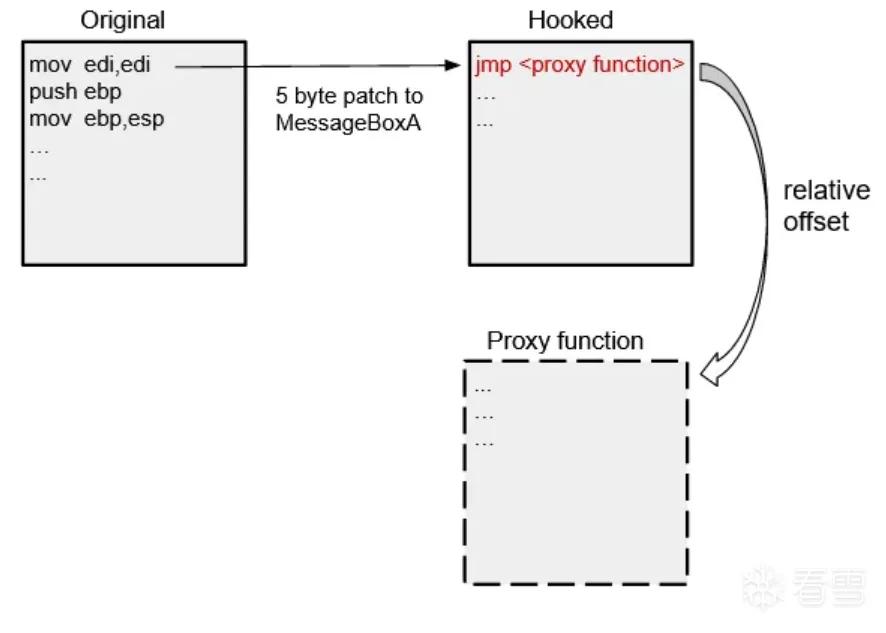
我们会Hook MessageBoxA,用jmp指令修改其前5个字节,并jmp到我们自订的函数裡。当调用MessageBoxA函数时,它会弹出一个对话框,其中包含标题和显示的文字。我们可以Hook它并修改其参数。

我反彙编了user32.dll,找到了MessageBoxA,其便是我们Hook的目标。标示出的5个字节和右边的彙编代码互相对应,这组指令在许多API函数中非常常见。用jmp覆写前5字节,便可将函数重定向到我们自己的函数中。我们要保存原始的指令,以便将执行传回该函数时可以引用(注: 用来恢复函数)。jmp指令是种相对跳转,其跳向一个偏移地址。jmp的操作码是E9,而其需要一组4字节的偏移量(注: 目标地址),这需要我们自己计算。
首先,从内存中取得MessageBoxA的地址。
1 2 3 | // 1. get memory address of the MessageBoxA function from user32.dll hinstLib= LoadLibraryA(TEXT("user32.dll"));function_address= GetProcAddress(hinstLib, "MessageBoxA"); |
通过动态连接技术,我们调用LoadLibraryA来载入包含所需函数的DLL,用GetProcAddress读取MessageBoxA在内存中的地址。用ReadProcessMemory将函数的前5个字节保存到缓衝区中。
1 2 | // 2. save the first 5 bytes into saved_bufferReadProcessMemory(GetCurrentProcess(), function_address, saved_buffer, 5, NULL); |
修改函数之前,我们得计算MessageBoxA到代理函数(马上就写! )的偏移(距离)。jmp <offset>指令会令EIP步过当前指令(5字节),并加上偏移: eip = eip + 5 + offset
1 | 偏移 = <目标地址> - (<指令地址> + 5) |
1 2 3 4 | proxy_address= &proxy_function;src= (DWORD)function_address + 5; dst= (DWORD)proxy_address;relative_offset= (DWORD *)(dst-src); |
以下是完整的实现过程,其会将我们写的补丁写入内从中的MessageBoxA。
1 2 3 4 5 6 7 8 9 10 11 12 13 14 15 16 17 18 19 20 21 22 23 24 25 26 27 | void install_hook(){ HINSTANCE hinstLib; VOID *proxy_address; DWORD *relative_offset; DWORD src; DWORD dst; CHAR patch[5]= {0}; // 1. get memory address of the MessageBoxA function from user32.dll hinstLib= LoadLibraryA(TEXT("user32.dll")); function_address= GetProcAddress(hinstLib, "MessageBoxA"); // 2. save the first 5 bytes into saved_buffer ReadProcessMemory(GetCurrentProcess(), function_address, saved_buffer, 5, NULL); // 3. overwrite the first 5 bytes with a call to proxy_function proxy_address= &proxy_function; src= (DWORD)function_address + 5; dst= (DWORD)proxy_address; relative_offset= (DWORD *)(dst-src); memcpy(patch, 1, "\xE9", 1); memcpy(patch + 1, 4, &relative_offset, 4); WriteProcessMemory(GetCurrentProcess(), (LPVOID)function_address, patch, 5, NULL);} |
说明: WriteProcessMemory和ReadProcessMemory会查询要访问的内存权限并修改它们,它真的很希望你能成功诶~
我们的代理函数要用与原函数一模一样的参数,调用约定,以及返回值类型。
1 2 3 4 5 6 7 8 9 10 11 12 | // The proxy function we will jump to after the hook has been installedint __stdcall proxy_function(HWND hWnd, LPCSTR lpText, LPCSTR lpCaption, UINT uType){ std::cout << "Hello from MessageBox!\n"; std::cout << "Text: " << (LPCSTR)lpText << "\nCaption: " << (LPCSTR)lpCaption << "\n"; // unhook the function (re-write the saved buffer) to prevent infinite recursion WriteProcessMemory(GetCurrentProcess(), (LPVOID)hooked_address, saved_buffer, 5, NULL); // return to the original function and modify the intended parameters return MessageBoxA(NULL, "yeet", "yeet", uType);} |
现在我们可以输出MessageBoxA的参数,修改它们,并继续执行原本的MessageBoxA函数。但如果此时我们直接调用MessageBoxA,便会进入不断被Hook的死循环中,然后造成堆栈溢出。为了避免此种情况发生,我们要将之前储存在缓衝区的字节重新写入MessageBoxA的开头。
此例只会引响一进程中的MessageBoxA调用,若想从导入的DLL中修改其他进程的函数,我会在另一篇文章中教你,你可以参考这个github范例。
因为代理函数会将旧字节重新写入函数中(unhook),我们还得不断重新Hook该函数以拦截接下来的调用。让我们谈谈TrampolineHook。
Trampolines
运用Trampoline函数,可以在保持Hook的状态下防止死循环。Trampoline的作用是执行被修改掉的5字节指令的工作,并跳过已安装的Hook。其通过代理函数调用。
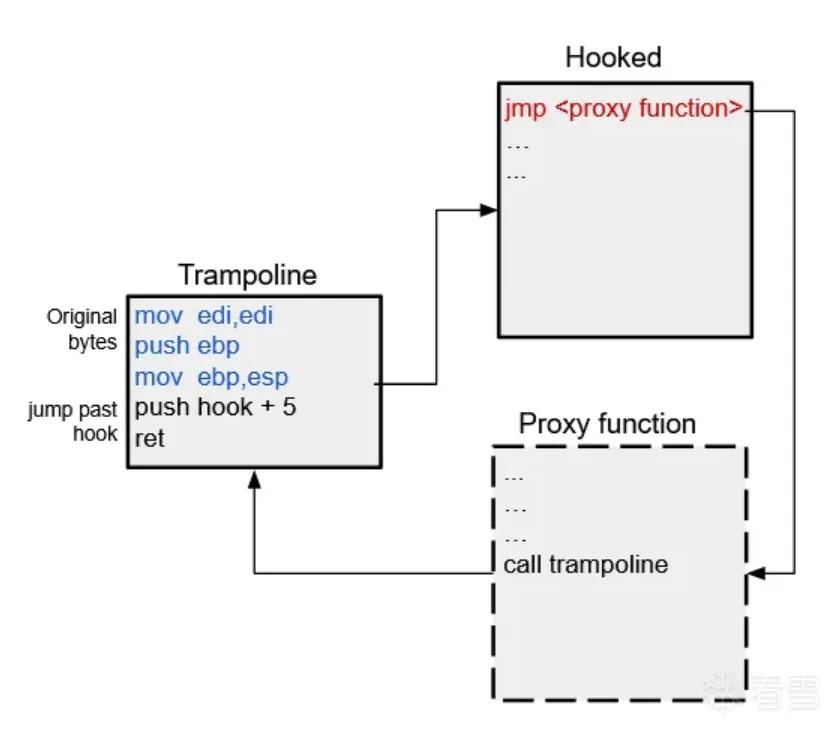
在原函数处跳过5字节,故不会执行jmp指令,也不会运行代理函数,我们直接传递已安装的Hook。我们把被hook的函数+5 的地址push进栈,然后用ret实现跳转。这两条指令用4字节地址,总共要6字节。故需要11字节(注: 原先5字节,加上后来的6字节)。修改原本的install_hook()函数实现Trampoline的功能。
1 2 3 4 5 6 7 8 9 10 11 12 13 14 15 16 17 18 19 20 21 22 23 24 25 26 27 28 29 30 31 32 33 34 35 36 | void install_hook(){ HINSTANCE hinstLib; VOID *proxy_address; DWORD *relative_offset; DWORD *hook_address; DWORD src; DWORD dst; CHAR patch[5]= {0}; char saved_buffer[5]; // buffer to save the original bytes FARPROC function_address= NULL; // 1. get memory address of the MessageBoxA function from user32.dll hinstLib= LoadLibraryA(TEXT("user32.dll")); function_address= GetProcAddress(hinstLib, "MessageBoxA"); // 2. save the first 5 bytes into saved_buffer ReadProcessMemory(GetCurrentProcess(), function_address, saved_buffer, 5, NULL); // 3. overwrite the first 5 bytes with a jump to proxy_function proxy_address= &proxy_function; src= (DWORD)function_address + 5; dst= (DWORD)proxy_address; relative_offset= (DWORD *)(dst-src); memcpy(patch, "\xE9", 1); memcpy(patch + 1, &relative_offset, 4); WriteProcessMemory(GetCurrentProcess(), (LPVOID)function_address, patch, 5, NULL); // 4. Build the trampoline trampoline_address= VirtualAlloc(NULL, 11, MEM_COMMIT, PAGE_EXECUTE_READWRITE); hook_address= (DWORD *)((DWORD)function_address + 5); memcpy((BYTE *)trampoline_address, &saved_buffer, 5); memcpy((BYTE *)trampoline_address + 5, "\x68", 1); memcpy((BYTE *)trampoline_address + 6, &hook_address, 4); memcpy((BYTE *)trampoline_address + 10, "\xC3", 1);} |
我们首先调用VirtualAlloc来分配11字节的内存空间,并将其指定为可执行,可读,且可写。这样才能让我们修改已分配的字节并执行它。在将trampoline写入内存后,可以通过代理函数调用它。
1 2 3 4 5 6 7 8 | int __stdcall proxy_function(HWND hWnd, LPCSTR lpText, LPCSTR lpCaption, UINT uType){ std::cout << "----------intercepted call to MessageBoxA----------\n"; std::cout << "Text: " << (LPCSTR)lpText << "\nCaption: " << (LPCSTR)lpCaption << "\n"; // pass to the trampoline with altered arguments which will then return to MessageBoxA defTrampolineFunc trampoline= (defTrampolineFunc)trampoline_address; return trampoline(hWnd, "yeet", "yeet", uType);} |
可在github找到完整代码,在此处可以找到更多关于Hooking的例子。
原文连接: https://medium.com/geekculture/basic-windows-api-hooking-acb8d275e9b8