缘起
我在上一篇文章中介绍了定位抛出异常的理论知识,本文会通过几个实例介绍各种情况下的定位方法。有调试符号如何定位?没有调试符号如何定位?32 位程序如何定位?64 位程序又该如何定位?
其实,32 位程序和 64 位程序定位过程大同小异,只不过在解析过程中需要注意,很多关键字段在 64 位程序中是偏移,需要加上模块基址得到虚拟地址后才能使用,而在 32 位程序中对应的字段就是虚拟地址,可以直接使用。
没有调试符号的时候定位异常类型会比较困难,需要根据上一篇文章中总结的步骤一步步的找到异常类型。有调试符号的情况会比较容易,有很多简便的查看方法。
一起来实战吧!
在开始实战之前,把相关结构体再贴一下,方便参考。
32 位关键结构
1 2 3 4 5 6 7 8 9 10 11 12 13 14 15 16 17 18 19 20 21 22 23 24 25 26 27 28 29 30 31 32 33 34 35 36 37 38 39 40 | 0:000> dt EHExceptionRecordTestThrowException!EHExceptionRecord +0x000 ExceptionCode : Uint4B +0x004 ExceptionFlags : Uint4B +0x008 ExceptionRecord : Ptr32 _EXCEPTION_RECORD +0x00c ExceptionAddress : Ptr32 Void +0x010 NumberParameters : Uint4B +0x014 params : EHExceptionRecord::EHParameters //<----0:000> dt EHExceptionRecord::EHParametersTestThrowException!EHExceptionRecord::EHParameters +0x000 magicNumber : Uint4B +0x004 pExceptionObject : Ptr32 Void +0x008 pThrowInfo : Ptr32 _s_ThrowInfo //<----0:000> dt _s_ThrowInfoTestThrowException!_s_ThrowInfo +0x000 attributes : Uint4B +0x004 pmfnUnwind : Ptr32 void +0x008 pForwardCompat : Ptr32 int +0x00c pCatchableTypeArray : Ptr32 _s_CatchableTypeArray //<----0:000> dt _s_CatchableTypeArrayTestThrowException!_s_CatchableTypeArray +0x000 nCatchableTypes : Int4B +0x004 arrayOfCatchableTypes : [0] Ptr32 _s_CatchableType //<----0:000> dt _s_CatchableTypeTestThrowException!_s_CatchableType +0x000 properties : Uint4B +0x004 pType : Ptr32 TypeDescriptor //<---- +0x008 thisDisplacement : PMD +0x014 sizeOrOffset : Int4B +0x018 copyFunction : Ptr32 void0:000> dt TypeDescriptorTestThrowException!TypeDescriptor +0x000 hash : Uint4B +0x004 spare : Ptr32 Void +0x008 name : [0] Char //<==== |
64 位关键结构
1 2 3 4 5 6 7 8 9 10 11 12 13 14 15 16 17 18 19 20 21 22 23 24 25 26 27 28 29 30 31 32 33 34 35 36 37 38 39 40 41 | 0:000> dt EHExceptionRecordVCRUNTIME140!EHExceptionRecord +0x000 ExceptionCode : Uint4B +0x004 ExceptionFlags : Uint4B +0x008 ExceptionRecord : Ptr64 _EXCEPTION_RECORD +0x010 ExceptionAddress : Ptr64 Void +0x018 NumberParameters : Uint4B +0x020 params : EHExceptionRecord::EHParameters //<----0:000> dt EHExceptionRecord::EHParametersVCRUNTIME140!EHExceptionRecord::EHParameters +0x000 magicNumber : Uint4B +0x008 pExceptionObject : Ptr64 Void +0x010 pThrowInfo : Ptr64 _s_ThrowInfo //<---- +0x018 pThrowImageBase : Ptr64 Void0:000> dt _s_ThrowInfoVCRUNTIME140!_s_ThrowInfo +0x000 attributes : Uint4B +0x004 pmfnUnwind : Int4B +0x008 pForwardCompat : Int4B +0x00c pCatchableTypeArray : Int4B //<----0:000> dt CatchableTypeArrayVCRUNTIME140!CatchableTypeArray +0x000 nCatchableTypes : Int4B +0x004 arrayOfCatchableTypes : [0] Int4B //<----0:000> dt CatchableTypeVCRUNTIME140!CatchableType +0x000 properties : Uint4B +0x004 pType : Int4B //<---- +0x008 thisDisplacement : PMD +0x014 sizeOrOffset : Int4B +0x018 copyFunction : Int4B0:000> dt TypeDescriptorVCRUNTIME140!TypeDescriptor +0x000 pVFTable : Ptr64 Void +0x008 spare : Ptr64 Void +0x010 name : [0] Char //<==== |
接下来,先介绍无调试符号时的定位方法,然后再介绍有调试符号时的定位方法。
无调试符号
如果没有导致异常的模块的调试符号,定位过程会比较复杂,需要根据上一篇文章中总结的方法一步步定位。此方法的坏处是麻烦,好处是比较通用,任何情况下都可以使用。
64 位程序
获取
EHParameters的地址。_CxxThrowException栈帧的rsp+0x28指向了EHParameters。_CxxThrowException对应栈帧的rsp是000000b9f2effb80。在windbg中输入? 000000b9f2effb80 + 0x28,如下图:

由上图红色高亮部分可知 EHParameters 的地址是 000000b9f2effba8。
获取
ThrowInfo的地址。EHParameters + 0x10的位置保存了ThrowInfo的地址,EHParameters + 0x18的位置保存了异常模块基址。在
windbg中输入dq 000000b9f2effba8,如下图:

由上图红色高亮部分可知 ThrowInfo 的地址是 00007ff71c542a20,异常模块基址是 00007ff71c540000。
说明: 如果有
vcruntimexxx.dll的调试符号,可以跳过前两步,直接切换到_CxxThrowException对应的栈帧即可得到ThrowInfo的地址和异常模块基址。
获取
CatchableTypeArray的地址。ThrowInfo + 0xc保存了CatchableTypeArray的偏移。在
windbg中输入dd 00007ff71c542a20,如下图:

由上图红色高亮部分可知 CatchableTypeArray 的偏移是 000029b8。
异常模块基址是 00007ff71c540000,所以 CatchableTypeArray 的地址是 00007ff71c540000 + 000029b8 = 00007ff71c5429b8。
获取
CatchableType的地址。CatchableTypeArray + 0x04保存了第一个CatchableType对象的偏移,CatchableTypeArray + 0x08保存了第二个CatchableType对象的偏移,以此类推。在
windbg中输入dd 00007ff71c5429b8,如下图:

由上图可知,一共有两个 CatchableType 类型的对象,第一个偏移是 000029d0,第二个偏移是 000029f8。
异常模块基址是 00007ff71c540000,所以第一个 CatchableType 对象的地址是 00007ff71c540000 + 000029d0 = 00007ff71c5429d0。
获取
TypeDescriptor的地址。CatchableType + 0x04保存了TypeDescriptor的偏移。在
windbg中输入dd 00007ff71c5429d0,如下图:

由上图红色高亮部分可知 TypeDescriptor 的偏移是 00004058。
异常模块基址是 00007ff71c540000,所以 TypeDescriptor 的地址是 00007ff71c540000 + 00004058 = 00007ff71c544058。
获取异常类型名。
TypeDescriptor + 0x10保存了编码后的异常类型名。在
windbg中输入da 00007ff71c544058 + 0x10,如下图:

从上图可知,异常类型是 .?AVbad_alloc@std@@,也就是 std::bad_alloc。
32 位程序
32 位程序和 64 位程序定位过程大同小异,只需要把 64 位程序定位过程中的偏移值当成地址使用即可。这里就不赘述了,参考下图:
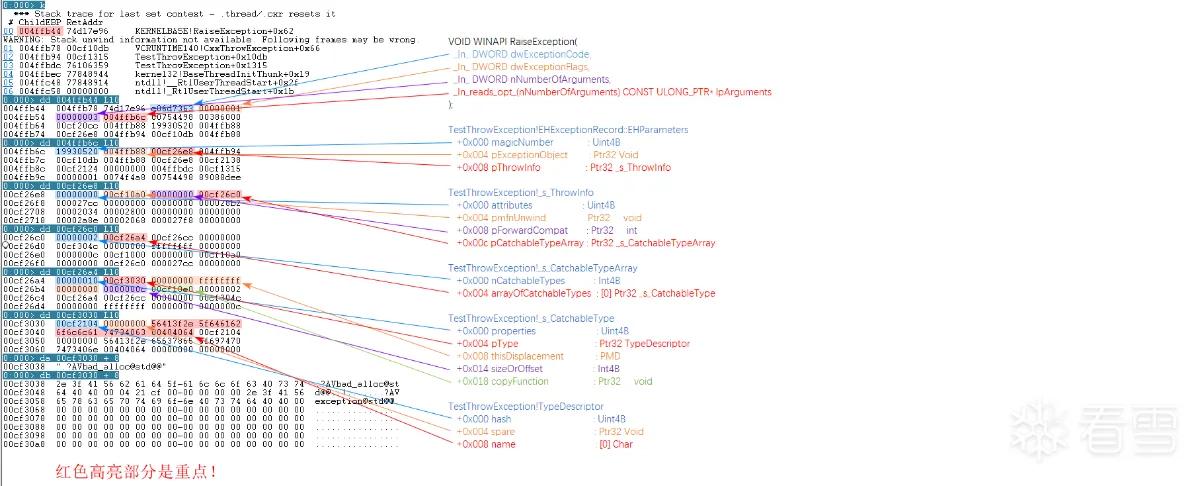
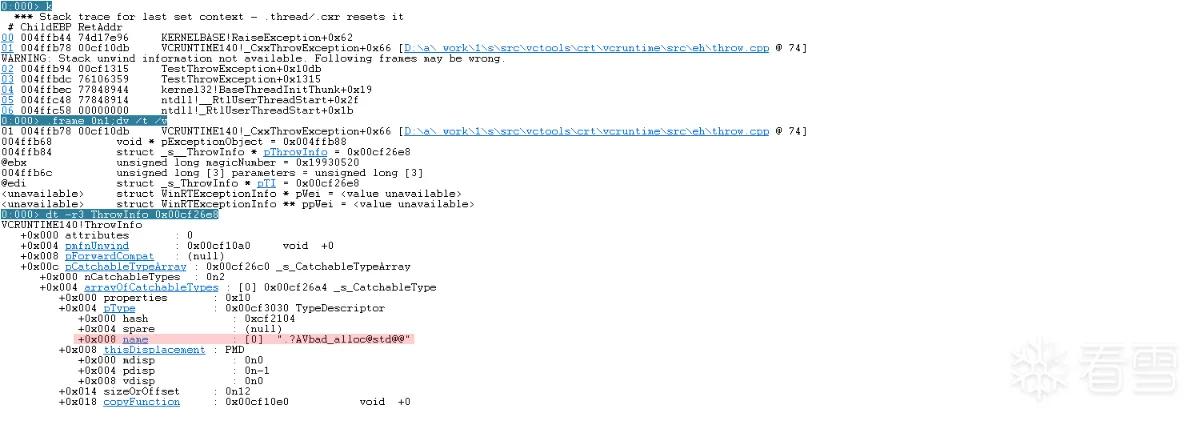
其实,对于 32 位程序,如果有 vcruntimexxx.dll 对应的符号,还有一种极其简单的方法,在 windbg 中输入 dt -r3 ThrowInfo address,如下图:
有调试符号
对于有调试符号的情况,不仅可以使用无调试符号的定位方法,还可以使用更简单的方法查看——通过查看 pExceptionObject 对象的虚函数表来推断对应的对象类型。
在测试程序中,pExceptionObject 的地址是 0x000000b9f2effc00,可以在 windbg 中执行 dps 0x000000b9f2effc00 即可查看异常对象对应的虚表,如下图:
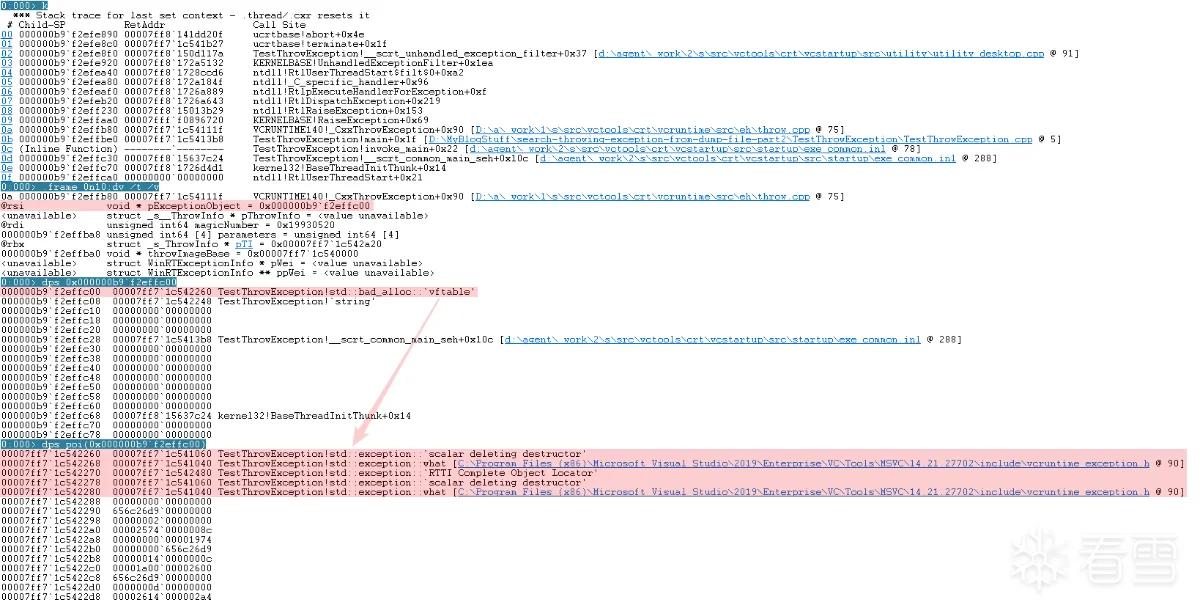
从上图可知,异常类型是 std::bad_alloc,其虚表内容都是其基类(std::exception)的虚函数,因为 std::bad_alloc 没重写任何虚函数,也没新增任何虚函数。
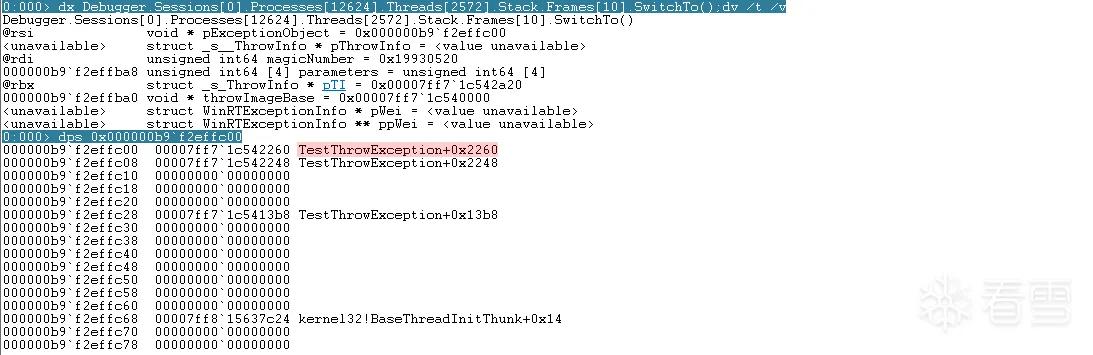
为什么没调试符号的时候不能用这个方法呢?因为没有调试符号的情况下,从 dps 的输出结果中看不到关键的虚表名称,也就不能推断出具体的异常类型了。
亲自动手
对应的程序源码工程文件及对应的转储文件已经上传到我的个人仓库了,感兴趣的小伙伴儿可以从以下链接自行下载:
还有一个更真实的转储文件,可以实战一把。因为比较大,我传到百度云了,可以到这里下载:
https://pan.baidu.com/s/1K7FzsseMlU6kmrMwm3jn4Q?pwd=8t47
总结
- 获取通过
throw抛出的异常的突破点在_CxxThrowException()函数,该函数有源码,涉及到的关键结构体都有源码可以查询。 - 查找
throw抛出的异常,关在是掌握对应的数据结构,务必要把关键的数据结构牢记于心。 - 如果有调试符号,还可以直接查看
pExceptionObject对象的虚函数表来进行推断。 - 在解析过程中,需要注意的是在
64位程序中,很多成员变量都是相对于发生异常模块的偏移,而不是直接可用的地址,需要先把偏移转换成虚拟地址后再使用。
参考资料
vs 源码